

适用于 Windows 10 / 11,涵盖安装、终端配置、旧版隐藏、迁移注意事项全流程。
1. 为什么切换
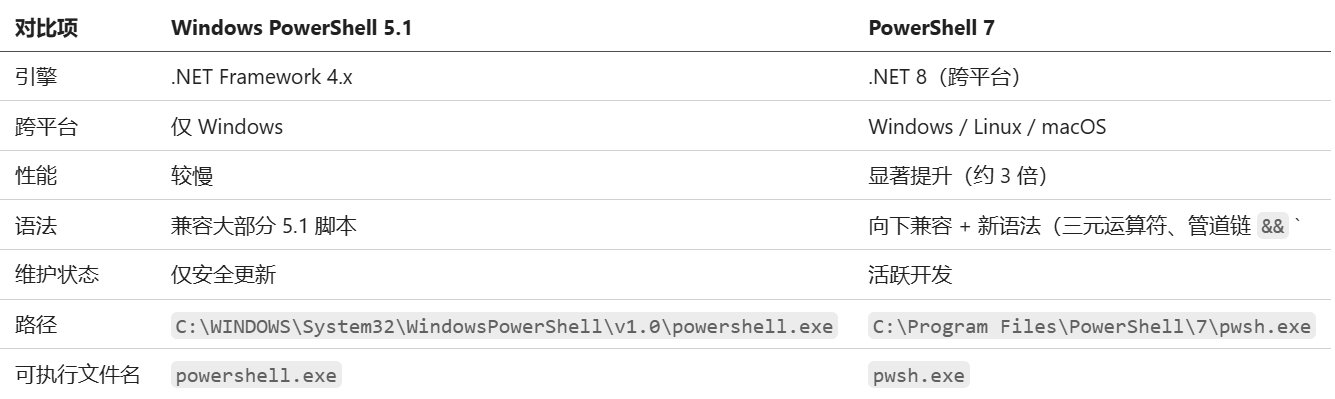
关键点:PowerShell 5.1 是 Windows 内置组件,无法卸载也不应删除。切换的本质是让所有终端入口默认使用 pwsh.exe,而非 powershell.exe。
2. 安装 PowerShell 7
方法一:winget(推荐)
winget install Microsoft.PowerShell
安装完成后验证:
pwsh -v
# 预期输出:PowerShell 7.x.x
方法二:MSI 安装包
前往 PowerShell GitHub Releases 下载最新
PowerShell-7.x.x-win-x64.msi双击运行,按向导完成安装
默认安装路径:
C:\Program Files\PowerShell\7\
方法三:Microsoft Store
在 Microsoft Store 搜索 "PowerShell",点击安装。Store 版本会自动更新。
3. 配置 Windows Terminal
3.1 修改默认配置文件
打开 Windows Terminal
点击标题栏下拉箭头 → 设置(或按
Ctrl+,)左侧 启动 → 默认配置文件 → 选择 PowerShell(注意不是 "Windows PowerShell")
点击 保存
或者直接编辑 JSON(设置页面左下角「打开 JSON 文件」):
{
    // 将 defaultProfile 从 Windows PowerShell 的 GUID
    // {61c54bbd-c2c6-5271-96e7-009a87ff44bf}
    // 改为 PowerShell 7 的 GUID
    "defaultProfile": "{574e775e-4f2a-5b96-ac1e-a2962a402336}",

    "profiles": {
        "list": [
            {
                // 旧版 — 隐藏掉
                "guid": "{61c54bbd-c2c6-5271-96e7-009a87ff44bf}",
                "name": "Windows PowerShell",
                "commandline": "%SystemRoot%\\System32\\WindowsPowerShell\\v1.0\\powershell.exe",
                "hidden": true          // ← 改为 true
            },
            {
                // 新版 — 默认使用
                "guid": "{574e775e-4f2a-5b96-ac1e-a2962a402336}",
                "name": "PowerShell",
                "source": "Windows.Terminal.PowershellCore",
                "hidden": false
            }
        ]
    }
}
3.2 隐藏旧版入口
将 Windows PowerShell 配置的 "hidden" 设为 true 后,它不再出现在新建标签页的下拉列表中。可执行文件本身保留在系统中,需要时仍可手动调用。
4. 配置 VSCode 集成终端
打开 VSCode 设置(Ctrl+,),搜索 terminal profile,或直接编辑 settings.json:
{
    // 默认终端设为 PowerShell 7
    "terminal.integrated.defaultProfile.windows": "PowerShell",

    // 显式指定 pwsh.exe 路径
    "terminal.integrated.profiles.windows": {
        "PowerShell": {
            "source": "PowerShell",
            "path": "C:\\Program Files\\PowerShell\\7\\pwsh.exe",
            "icon": "terminal-powershell"
        }
    }
}
保存后,新打开的终端(Ctrl+`)将自动使用 PowerShell 7。
5. 验证切换结果
# 查看当前版本
$PSVersionTable
预期输出:
PSVersion                      7.6.3
PSEdition                      Core
PSCompatibleVersions           {1.0, 2.0, 3.0, 4.0...}
PSRemotingProtocolVersion      2.3
SerializationVersion           1.1.0.1
WSManStackVersion              3.0
GitCommitId                    7.6.3
OS                             Microsoft Windows 10.0.26100.0
Platform                       Win32NT
关键指标:PSEdition 应为 Core,PSVersion 应为 7.x.x。
6. 迁移注意事项
6.1 模块兼容性
PowerShell 7 不兼容以下旧模块(依赖 .NET Framework):
ActiveDirectory(需安装兼容版本ActiveDirectory 1.0.2.2+)WMI相关 cmdlet(已替换为CimCmdlets)部分 Exchange / SharePoint 模块
检查已安装模块的兼容性:
Get-Module -ListAvailable | Where-Object CompatiblePSEditions -notcontains "Core"
6.2 脚本适配
大部分 5.1 脚本可以直接在 7 中运行。常见需修改的点:
# 旧写法 — 仍可用但建议更新
Get-WmiObject Win32_Process

# 新写法 — 推荐
Get-CimInstance Win32_Process

# 新语法(仅 7 支持)
$result = $value ?? 'default'           # 空合并运算符
$condition ? 'yes' : 'no'               # 三元运算符
cmd1 && cmd2                             # 管道链
cmd1 || cmd2                             # 管道链
6.3 执行策略
PowerShell 7 的执行策略独立于 5.1,需要单独设置:
# 查看当前执行策略
Get-ExecutionPolicy -List

# 为 CurrentUser 设置 RemoteSigned
Set-ExecutionPolicy -ExecutionPolicy RemoteSigned -Scope CurrentUser
6.4 Profile 文件

两个版本的 $PROFILE 路径不同,配置互不影响:
如果 5.1 的 profile 中有自定义函数或别名,需要复制到 7 的新 profile 中:
# 查看 7 的 profile 路径
$PROFILE

# 如果旧 profile 存在,复制内容
$oldProfile = "$HOME\Documents\WindowsPowerShell\Microsoft.PowerShell_profile.ps1"
if (Test-Path $oldProfile) {
    Get-Content $oldProfile | Add-Content $PROFILE
    Write-Host "已合并旧 profile" -ForegroundColor Green
}
7. 回滚方法
如果遇到兼容性问题需要临时使用 5.1:
Windows Terminal:在设置中将
defaultProfile改回{61c54bbd-c2c6-5271-96e7-009a87ff44bf},将旧配置的hidden改回false命令行:直接运行
powershell.exe即可启动 5.1VSCode:在终端下拉菜单中选择 "Windows PowerShell"
PowerShell 7 和 5.1 可以完全共存,互不干扰。
8. 快速检查清单
[ ] PowerShell 7 已安装(
pwsh -v输出 7.x.x)[ ] Windows Terminal 默认配置文件已改为 PowerShell 7
[ ] Windows Terminal 中旧版入口已隐藏
[ ] VSCode 集成终端默认使用 PowerShell 7
[ ] 执行策略已设置(
Get-ExecutionPolicy)[ ] Profile 文件已迁移(
$PROFILE)[ ] 关键脚本测试通过
总结:切换的核心是三步——装 7、改默认、藏 5。5.1 作为系统组件保留在后台,日常使用全部走 7,干净利落。